


For years, one of the biggest questions surrounding AI-powered Google Search has been surprisingly simple:
Is my website actually appearing in AI results?
Well, Google Search Console (GSC) can now provide part of that answer.
On June 3, 2026, Google announced new Generative AI performance reports in Search Console. The reports provide website owners and SEOs with a dedicated view of their visibility inside Google's generative AI search experiences, including AI Overviews and AI Mode.
Google initially introduced the feature gradually. As of August 31, 2026, Google says the Generative AI performance insights have been rolled out to websites worldwide, so at the date I'm writing this article, September 14th, you should already have that new option available for your GSC properties.
This new feature is an important addition to Search Console, however, as with other reports in GSC, it is equally important to understand what the report does not tell you.
It is not a complete AI traffic report. It does not tell you which exact search queries caused Google to use your website, and it currently does not provide dedicated clicks, click-through rate, or average position.
What it gives you is something more specific:
A first-party view of your website's visibility inside Google's generative AI search experiences.
Used with that limitation in mind, it can provide genuinely useful information about how Google is surfacing your content in AI-powered Search.
What Is the Generative AI Report in Google Search Console?
The Generative AI performance report is available within the Performance section of Google Search Console for eligible properties.
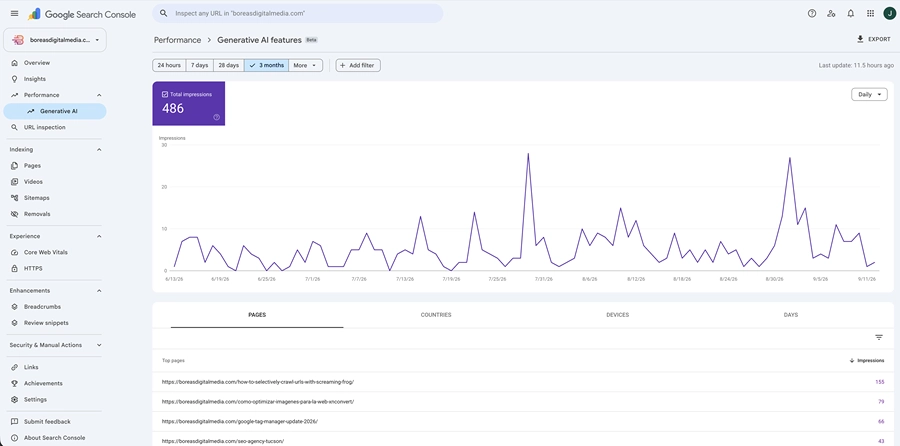
It measures how often links from your website appear inside supported generative AI features on Google Search.
For Search, the report currently includes:
- AI Overviews
- AI Mode
Google has also introduced a separate Generative AI performance report for AI features appearing in Google Discover.
The Search and Discover reports should therefore not be confused with each other.
This article focuses specifically on the Generative AI performance report for Google Search.
Another important distinction is that this report only measures Google's own generative AI experiences. It does not tell you whether your website has been mentioned, cited, or visited through ChatGPT, Claude, Perplexity, Copilot, or other external AI platforms.
The report should therefore be understood as a measure of Google Search AI visibility, not as a universal measurement of a website's visibility across artificial intelligence platforms.
Was AI Search Data Missing From Search Console Before?
Not exactly, and this is one of the most important details of the update.
Traffic and visibility from AI Overviews and AI Mode were already being incorporated into the standard Search Console Performance report under the Web search type.
Google has not suddenly started counting AI-powered search activity for the first time.
Instead, it has created a separate view that lets website owners isolate one specific part of that existing Search visibility: impressions from Google's generative AI features.
That distinction matters when comparing historical Search Console data.
The introduction of the new report does not add a new block of impressions to your regular Web Search totals. It provides a clearer way to examine impressions that were already part of Google's broader Search reporting but became to impressions from generative AI results.
In practical terms, the traditional Performance report remains the broader picture.
The Generative AI report is a more specialized view inside that picture.
What Data Does the Generative AI Report Show?
At the moment, the report is primarily an impressions report.
An impression is recorded when a link from your website is shown to a user within an eligible generative AI experience according to Google's impression-counting rules.
The report lets you analyze those impressions using several dimensions.
Pages
The Pages view shows which URLs from your website have appeared in Google's generative AI results at the SERPs.
For most website owners, this will probably be the most immediately useful dimension.
It can help answer questions like:
- Which pages are appearing most frequently?
- Is Generative AI visibility concentrated on only a few URLs?
- Are blog articles appearing more often than commercial pages?
- Are recently updated pages beginning to receive impressions?
Search Console generally assigns this data to the canonical URL selected by Google, just as it does with its standard Performance reporting.
Countries
The Countries view shows where Generative AI impressions originated.
This may be particularly useful for websites serving multiple geographic markets.
For example, a website targeting both the United States and Europe may discover that most of its AI Search visibility is currently coming from one region.
Devices
For Google Search, Generative AI impressions can also be grouped by device:
- Desktop
- Mobile
- Tablet
This provides additional context about how users encountering your content through Google's AI features are accessing Search.
Dates
The report also allows you to analyze Generative AI visibility over time.
This makes it possible to identify broader trends rather than focusing on individual daily changes.
For example, you can see whether impressions are generally increasing, decreasing, or remaining stable over a longer period.
Taken together, these dimensions can help answer questions such as:
- Which pages appear most often in Google's AI features?
- Is my Generative AI visibility changing over time?
- Which countries generate most of these impressions?
- Is AI visibility concentrated in one part of my website?
- Are users seeing these results mainly on desktop or mobile?
Those are useful questions.
But there are still several important questions the report cannot answer.
One Important Detail: The Chart and Table May Not Match Exactly
There is a technical detail worth understanding when reading the report.
Search Console can aggregate impressions in different ways.
The main chart is generally aggregated at the property level.
That means that if two different links from the same website appear in the same Generative AI result, Search Console may count that as one impression for the property in the chart total.
When the table is grouped by page, however, data is aggregated by individual URL.
That means the numbers shown in the chart and the sum of the individual page rows do not always have to match exactly.
This is normal Search Console behavior and does not necessarily indicate missing or incorrect data.
The same general aggregation rules used elsewhere in Search Console also apply to the Generative AI report.
What Doesn't the Generative AI Report Show?
This is where expectations need to be managed.
The dedicated report does not currently provide the same range of metrics available in the traditional Search Performance report.
Most importantly, it does not provide dedicated data for the following.
Search Queries
You cannot currently see which exact searches caused a page from your website to appear in an AI Overview or AI Mode response.
This is one of the largest limitations of the report.
You may know that a particular URL generated 1,000 Generative AI impressions, for example, but Search Console will not tell you the individual queries responsible for those impressions inside this report.
Clicks
The dedicated Generative AI report does not show how many users clicked your website from those impressions.
This does not mean Google ignores those clicks.
Clicks from eligible external links in AI Overviews and AI Mode are included in Google's wider Search Console reporting.
They simply cannot currently be isolated as a dedicated click metric inside the Generative AI report, although combining Search Console and Google Analytics data can provide additional context about the traffic and conversions associated with pages receiving Generative AI impressions, even if it still does not provide perfect one-to-one attribution.
Click-Through Rate
Obviously, without dedicated click data, Search Console cannot calculate a Generative AI-specific click-through rate.
Average Position
The dedicated report is also not a traditional rankings report.
Google does have rules for calculating position when AI Overviews and AI Mode appear in Search, but that position data is part of the broader Performance reporting rather than a metric exposed in the dedicated Generative AI report.
This means it would be a mistake to interpret 10,000 Generative AI impressions as 10,000 visits — or even as evidence that those impressions produced a particular amount of traffic.
The report is measuring visibility.
To evaluate traffic and business results, you need other data, such as that provided by Google Analytics
Does Google Still Count Clicks From AI Overviews and AI Mode?
Yes.
This is where the distinction between the Generative AI report and the regular Search Performance report becomes especially important.
Google confirms that clicking an external website link inside an AI Overview counts as a click.
The same applies to an external link inside AI Mode.
Those interactions contribute to the wider Web Search performance data even though the Generative AI report does not currently display them as an isolated metric.
AI Mode also allows users to continue a search by asking follow-up questions.
Google treats a follow-up question as a new query. Impressions, clicks, and other Search data generated by the resulting response are therefore associated with that new query.
In other words, Search Console continues to measure interaction with Google's AI-powered Search experiences.
The current limitation is our ability to separate that interaction cleanly inside the dedicated Generative AI report.
Search Labs Experiments Are Not Included
There is another limitation worth noting.
Google says that Search Console does not include data from experiments running inside Search Labs.
Those experiences are still considered experimental and may change while they are being developed.
The Generative AI report therefore represents supported production features such as AI Overviews and AI Mode rather than every experimental AI feature Google may currently be testing.
How Should You Use the Report?
The most useful way to approach the report is as a visibility indicator, not as a replacement for existing SEO reporting.
Start with the Pages view.
Identify which URLs are receiving the most Generative AI impressions and observe how that changes over time. You can then compare that information with your existing Search Console and Analytics data.
The different tools answer different questions.
The Generative AI report can tell you:
Is my content appearing in Google's generative AI search experiences?
The standard Search Performance report can tell you:
How is my website performing across Google Search overall?
Google Analytics can help answer:
What happens after users actually reach the website?
Those are related questions, but they are not the same measurement.
Generative AI impressions, organic clicks, website sessions, leads, and conversions should not be treated as interchangeable metrics... you should already know that 😉.
Does This Report Change How SEO Works?
Not fundamentally.
The new report changes what website owners can measure, rather than introducing a completely separate search ecosystem. Measurement and performance analysis are already part of a broader SEO strategy, helping connect changes in search visibility with the work being done across content, technical SEO, and optimization.
Google's own documentation states that its generative AI features are built on its existing Search infrastructure and ranking systems.
For Google Search, AI Overviews and AI Mode remain closely connected to traditional search indexing and retrieval.
A page generally needs to be indexed and eligible to appear in Google Search with a snippet before it can appear as a supporting link in these generative AI experiences.
Google also says there is no special Schema markup required specifically for AI Overviews or AI Mode.
Likewise, Google Search does not require special AI files such as llms.txt in order for content to appear in these features.
Terms such as AEO — Answer Engine Optimization — and GEO — Generative Engine Optimization — are increasingly common in the marketing industry, but Google's own position is that optimization for its generative Search experiences remains part of SEO.
That does not mean AI Search should be ignored.
It means the arrival of a new report should not be mistaken for evidence that Google has created an entirely separate set of technical ranking requirements.
Search Console Also Gives Website Owners Control Over AI Inclusion
Alongside the new reporting features, Google has introduced a Search generative AI control inside Search Console.
It can be found under:
Settings → Search generative AI
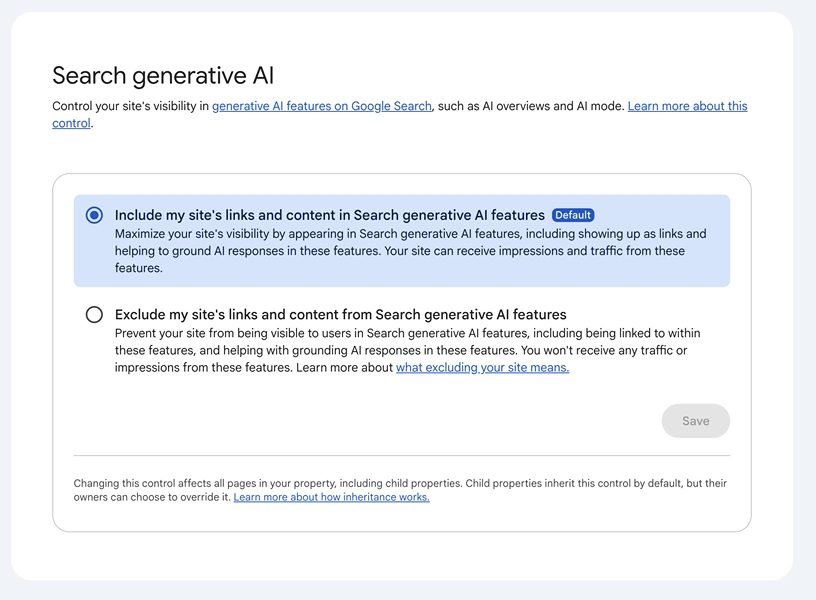
Google says this control was also rolled out worldwide as of August 31, 2026.
By default, websites are included.
Property owners can choose to allow their site's links and content to appear in supported generative AI features, including:
- AI Overviews
- AI Mode
- Generative AI features in Google Discover
They can also choose to exclude the property.
If a site is excluded, Google says its links and content will no longer be eligible to appear or help ground responses in those supported generative AI experiences.
As a result, the site would also stop receiving impressions and traffic from those features.
This setting is important, but it should not be confused with noindex.
Excluding a site from Google's generative AI features does not remove it from traditional Google Search.
Google also states that this control is not a ranking signal for the rest of Search.
It is specifically a control over participation in supported generative AI Search experiences.
What If You Don't See the Generative AI Report?
As of August 31, 2026, Google states that the Generative AI performance insights have been rolled out worldwide.
However, seeing the report still depends on the property having relevant data.
Google says the report may not appear if your website has not generated enough impressions in supported generative AI features.
Another possible reason is that the website has been excluded using the Search generative AI control.
Google's Help Center also continues to note that report availability may vary between properties.
Therefore, the absence of the report should not automatically be interpreted as a technical SEO problem.
It may simply mean that Search Console does not yet have enough Generative AI impression data to display for that property.
The August 2026 Generative AI Reporting Issue Has Been Resolved
There was one important data issue during the initial rollout.
Google reported a logging problem affecting the Generative AI Search report between August 13 and August 17, 2026.
During that period, reported impressions appeared lower than they should have.
The issue affected reporting only. It did not represent an actual loss of Search visibility.
Google subsequently restored the missing data, and on August 21 confirmed that the Performance report once again contained complete metrics for the affected period.
So if you previously noticed an unusual decline during those dates, that specific reporting problem should no longer affect the historical data.
It is still a useful reminder of a broader analytics principle: A sudden movement in a chart does not always represent a real change in website performance. Don't push the panic button!
What Does the Generative AI Report Actually Change?
The new Generative AI report does not replace traditional Search Console reporting. It is also part of a broader expansion of Search Console. Google has recently introduced other ways to measure organic visibility beyond traditional website results, including Platform Properties for social media and video content.
It adds another layer.
Before this report existed, website owners knew that AI Overviews and AI Mode were influencing Google Search, but had very limited first-party information about whether their own content was appearing inside those experiences.
We now have part of that answer.
We can see which pages are receiving Generative AI impressions.
We can measure how that visibility changes over time.
We can analyze it by country and device.
We can separate this visibility from the broader Search Performance report.
What we still cannot do is directly connect those impressions with the exact queries, dedicated clicks, click-through rates, or conversions they generated.
That distinction is important.
For now, the most accurate way to interpret the report is as a new measurement of organic visibility inside Google's generative AI Search experiences.
Google Search is evolving, and the tools used to measure it are evolving as well.
The new Generative AI performance report gives website owners a clearer view of one part of that change — without replacing the Search Console, Analytics, and SEO metrics we already use to understand overall search performance.